How can we help?


Monetary incentives are not allowed.
However, other types of incentives like trading signals and educational support are allowed.
If there are other types of incentives you want to offer, check with your Country Manager first before offering.
If you want to offer incentives, you'll need to follow these conditions:
- Inform your Country Manager before launching any incentive programme.
- Only use incentives that have been approved.
- Ensure that all activities comply with the provided guidelines.
Important: Failure to comply will result in Partner account suspension. Always consult with your Account Manager before offering any incentives.
Enter your email and click “Forgot password?” on the Login page. Follow the instructions to reset it.
If you’ve reset your password and confirmed your email matches but still can’t log in, contact us via live chat for further assistance.
Partners have access to the following marketing resources:
- Banners
- Text advertisements
- QR
For custom marketing tools, contact your account manager or contact us via live chat.
To update your payment method:
- Log in to Partner’s Hub.
- Navigate to the “Finances” section.
- Click Payment instructions.
- Select your preferred payment method.
- Confirm your new payment method by saving the changes.
Partner reports provide detailed insights such as:
- Monthly and yearly commission summaries
- Client deposits
- Total referral count
- Your affiliate commission plan
- Channel analytics (performance by traffic source)
- Trading history of referred clients
To view your commissions:
- Log in to Partner's Hub.
- Click the red “Open Dashboard” button.
- In the dashboard, go to the “Partner Area”.
- Click My Reports to view your earnings and commission details.
- Log in to Partner’s Hub.
- Click the red “Open Dashboard” button.
- In the dashboard, go to “Partner Area”.
- Click My Referral Links.
- Choose your preferred commission plan — you’ll see three referral links available:
- Revenue Share (for Options trading and CFDs trading)
- Turnover (for Options trading only)
- Master Partner
You cannot update your referral links. We don't change your referral links as this can affect clients.
To check your linked clients:
- Log in to Partner's Hub.
- Go to the “Partner Area”.
- Click My Clients.
The Deriv API (Application Programmable Interface) allows developers to create custom trading apps that integrate with the Deriv trading platform.
This API for trading allows developers to:
- Manage accounts
- Place trades
- Access real-time market data
- Build specialised trading tools
This provides greater flexibility and control for a personalised trading experience.
No, client contact details are not accessible.
In the My Clients report, you can only view:
- The client’s ID number
- Their registration date
- Their deposit amount
- The commissions you’ve earned from them
To get started with Deriv API:
- Create a Deriv account.
- Familiarise yourself with the Deriv API documentation.
- Create an API application.
- Authorise your application.
- Make API requests.
- Test your trading API integration.
To change your residence, please provide a proof of address from your new residence country. It should show your name, address, and be dated within the last 12 months. Contact us via live chat to request the change.
You can monetise your API application through various methods such as:
- Charging clients for API access to your trading app.
- Offering premium features for a fee.
- Engaging in affiliate marketing or referral programmes.
- Adding a markup to contract prices within your app.
For more information, read this guide.
You can register your trading app via Deriv API.
- Log in to api.deriv.com using your Deriv credentials.
- Navigate to the Dashboard.
- In the Application Manager Tab, you’ll find a list of all the apps you’ve created, along with their details like app ID, name, redirect URL and scope.
A percentage markup is an additional charge you can add to the standard contract prices within your app.
By applying this markup, you earn a profit from each contract purchased through your app. The difference between the standard contract price and the marked-up price is your earnings.
Commissions are paid into your Deriv account in fiat currency around the 15th of each month.
If you don’t have a Deriv account, you can sign up.
To check your commission:
- Go to API Explorer.
- Select “Application: Markup Statistics” from the drop-down menu.
- Key in the required information and click on “send request”.
To create a Deriv API token:
- Go to the Deriv dashboard or your Deriv account settings on API token.
- Select the scopes based on the access needed and type a name for the token.Click on “Create” and copy to use.
- All active tokens will appear below.
For more information, refer to our documentation on how to create a Deriv API token.
- Log in to api.deriv.com using your Deriv account.
- Navigate to the Dashboard.
- Go to the API Token Manager tab; you’ll find a list of all the API tokens likened to your account, along with their details like token name, account type, token scope, and last used.
As a partner with Deriv, here are the ways you can earn with us:
- Commissions from CFDs trades
- Commissions from Options trades
- Partner tiering programme
- Deriv API
Learn more about how you can earn with Deriv.
To become a Deriv partner:
- Go to the Partners page.
- Click Sign up at the top right.
- Select your country or region, and enter your email address.
- Click Next to get a verification code.
- Enter the verification code and set up a password.
Note: If you already have a Deriv trading account, simply sign up using the same email address.
To be eligible as a Deriv partner, you must:
- Be 18 years old or older
- Not reside in a FATF-restricted country
Anyone capable of referring traders is welcome to apply.
If you are any of the following, you’ll have an even better chance of referring potential clients:
- Trading experts
- Content creators (bloggers, YouTubers, social media influencers)
- Software developers
There is no fee to join any of Deriv partnership programmes. It is free of charge and does not involve any hidden costs.
Your commissions are credited to your Partner’s Hub Wallet as follows:
- Referral commissions: Credited monthly
- Trade commissions: Credited daily
You can access your commissions by:
- Withdrawing directly by selecting your preferred payment method in the Partner’s Hub Wallet.
- Transfer to your Deriv trading account if you'd like to use the funds for trading.
There’s no waiting period for withdrawal, as you can withdraw as soon as the commissions are credited.
Note:
- You can transfer funds from your Partner’s Hub Wallet to your Deriv trading account, but not the other way around.
- Some Partners may still receive commissions directly into their previously selected payment method.
A referred client is an individual who:
- Signs up using your unique referral link
- Deposits funds into their account
- Begins trading on Deriv platforms
Your commissions are earned based on the trading activity of your referred clients.
To start earning commissions from Options trades, you need to:
- Sign up for a Partner’s Hub account to become a Deriv partner.
- Go to Open dashboard > My Referral Links.
- Choose your preferred Options commission plan. Each plan comes with a unique referral link:
- Turnover (applies to both Options and CFDs trading)
- Revenue Share (applies to Options trading only)
- Click the hamburger icon next to your chosen plan.
- Select Copy Link to share it with your clients.
Learn more about how to start earning commissions from CFDs trading.
Yes, please refer to our guidelines.
As a Deriv partner promoting Options trading, you’ll enjoy the following benefits:
- Up to 45% commission (from Revenue Share or Turnover plan)
- Multilingual support to reach clients in different regions
- Detailed earnings reports to track your performance
- A dedicated Account Manager to guide your growth
- 24/7 live chat support for you and your clients
We have these commission plans for partners promoting Options:
- Revenue Share: Earn commissions up to 45% based on the monthly net revenue generated by your clients.
- Turnover: Earn up to 1.5% on Digital Options stakes and up to 40% of Deriv’s commission from contracts such as Multipliers, Accumulators, and others.
For partners promoting CFDs, refer to this question on CFD calculations.
Partners will earn commission from clients who trade Options on:
- Deriv platforms: Deriv Trader, SmartTrader, Deriv Bot, Deriv Nakala, and Deriv GO.
- Third-party platforms: Only via Deriv API.
For partners with clients who trade CFDs, refer to Which trading platforms are part of the Deriv IB programme?
Commission = Stake amount x Turnover commission (%)
If a client trades Digital Options with a stake of USD 10 and receives a payout of USD 15:
- Payout probability

Based on the probability chart, this falls under the 0.5% commission rate
- Commission calculation

Total commission earned: USD 0.05
For monthly net revenue of Options trades:
- USD 20,000 or less: 30% commission
- Exceeding USD 20,000: 45% commission
For example:
If a client generates USD 10,000 in monthly net revenue:
- Commission: USD 10,000 x 30% = USD 3,000
If a client generates USD 25,000 in monthly net revenue:
- Commission for first USD 20,000: USD 20,000 x 30% = USD 6,000
- Commission for remaining USD 5,000: USD 5,000 x 45% = USD 2,250
- Total commission: USD 6,000 + USD 2,250 = USD 8,250
Only Multiplier Financials are excluded from Partner commission generation.
Digital Options: Based on the payout probability of the client's contracts. For more detailed calculations, refer to the commission structure of Digital Options.
Multipliers: 40% of commissions Deriv receives
Accumulator Options: 40% of commissions Deriv receives
Turbo Options: 40% of commissions Deriv receives
Vanilla Options: 40% of commissions Deriv receives
Lookbacks (only on SmartTrader): 0.8% of the trade stake
Note: EU-based partners can sign up for the Turnover plan but can only refer clients who reside outside the EU.
Commission = Stake amount x 0.8%
If a client trades Lookbacks with a stake of USD 10:
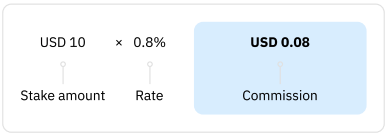
Total commission earned: USD 0.08
Commission = Client fee x 40%
Client trades multipliers with a stake of USD137 with a multiplier of 100. The client ischarged USD 5 for this trade (client fee).

Total commission earned: USD 2
For Digital Options, the commission is based on the payout probability of the client’s contracts.
Deriv’s Revenue Share plan allows partners to earn commissions based on the monthly net revenue generated by their clients' Options trades. The commission rate varies depending on the amount of net revenue generated.
Please note that partners residing in the EU can sign up for the Revenue Share plan but can only refer clients residing outside the EU.
Commission = Client charges x 40%
No, CPA is a one-time payment per client.
Example 1
If a referred client with a DIEL account deposits USD 100 in one transaction:
Total commission earned = USD 100
Example 2
If a referred client with a DIEL account based in the EU deposits USD 50 in their first transaction:
Commission earned = USD 0
When the same client deposits USD 50 in a second transaction:
Total commission earned = USD 100
Example 3
If a referred client with a DIEL account deposits USD 200 in one transaction:
Total commission earned = USD 100
The CPA plan is available to affiliates with accounts registered under Deriv Investments (Europe) Limited (DIEL).
To check your eligibility, contact us via live chat.
The CPA plan is for Affiliates who target clients in the EU. You earn USD 100 when a newly referred client with an EU account deposits a total of USD 100 (or its equivalent) into their Deriv account, either in a single deposit or cumulatively.
Note the following restrictions:
- It is limited to affiliates promoting to clients with a DIEL account.
- Due to regulatory restrictions, you cannot have clients residing in Portugal or Spain.
1. Commissions
- Revenue Share: From clients' revenue
- Turnover: From clients' trades on Digital Options (based on contract's payout probability) and Options (based on trade commission, up to 40%)
- CPA: From clients' deposits
2. How to Register
- Revenue Share: On the Deriv website
- Turnover: On the Deriv website
- CPA: On the Deriv website
3. Eligible Clients
- Revenue Share: Non-EU clients
- Turnover: Non-EU clients
- CPA: Clients with a EU account
4. IB
- Revenue Share: Yes
- Turnover: Yes
- CPA: No
5. Platforms
- Revenue Share: All official Deriv platforms & third-party platforms via Deriv API
- Turnover: All official Deriv platforms & third-party platforms via Deriv API
- CPA: Not applicable
6. Trading Instruments
- Revenue Share: Digital Options, Accumulator Options, Vanilla Options, Turbo Options, Multipliers on Derived Indices
- Turnover: Digital Options, Accumulator Options, Vanilla Options, Turbo Options, Multipliers
- CPA: Not applicable
To start earning commissions from CFDs trades, you need to:
- Sign up for a Partner’s Hub account to become a Deriv Partner.
- In the dashboard, go to the “Partner Area”.
- Click My Referral Links.
- Select Revenue Share to get your referral link.
- Share your referral link with your clients.
Learn more about how to start earning commissions from Options trading.
You'll earn commission when your clients trade CFDs on:
- Deriv MT5
- Deriv cTrader
Formula (per side)
Commission = (Traded volume in USD) × (Commission rate) ÷ 100,000
To calculate traded volume in USD:
Traded volume in USD = (Volume in lots) × (Contract size) × (Execution price) × (Conversion rate to USD)
Example calculation with EUR/USD
Let’s say:
- You traded 1 lot of EUR/USD
- Each contract = 100,000 units (standard forex contract size)
- The current price is 1.10
- Conversion rate = 1 (since it’s in USD)
- The commission rate (one side) is $10 per 100,000 USD traded
How to calculate
1. Find the traded volume in USD:
1 (lot) × 100,000 (contract size) × 1.10 (price) × 1 (USD rate) = 10,000 USD
So, the total traded volume = 110,000 USD
2. Apply the commission formula:
Commission= (110,000 × 10) ÷ 100,000 = 11 USD
So, $11 commission per side
3. If you open and close the trade (round trade):
11×2 = 22
$22 total commission
As a Deriv partner promoting CFDs trading, you’ll enjoy the following benefits:
- Commissions on client CFD trades (even on weekends and public holidays)
- Multilingual support to reach clients in different regions
- Daily payouts to your MT5 Standard account
- Detailed earnings reports to track your performance
- A dedicated Account Manager to guide your growth
- 24/7 live chat support for you and your clients
For existing partners:
- Deriv MT5: Your commissions will be credited to your MT5 Standard account daily. To withdraw, transfer the funds to your Deriv account and make a withdrawal.
- Deriv cTrader: Your commissions will be credited into your real Deriv account daily.
For new partners:
- Your commissions will be credited to your Partner’s Hub Wallet instead of MT5 or cTrader.
You can withdraw your commissions as soon as they are credited into your account. There is no required waiting period for withdrawals.
CFD commission calculations vary depending on the platform your client trades on, as well as the account type. Typically, commissions are based on your client's trade volume or lot size.
You can find the exact commission rates and calculation methods for each trading platform and account type below:
- Deriv MT5 Standard account: Commission rates | Commission calculations
- Deriv MT5 Financial account: Commission rates | Commission calculations
- Deriv MT5 Financial STP account: Commission rates | Commission calculations
- Deriv MT5 Swap-free account: Commission rates | Commission calculations
- Deriv MT5 Zero Spread account: Commission rates | Commission calculations
- Deriv MT5 Gold account: Commission rates
- Deriv cTrader: Commission rates | Commission calculations
The commission rates vary by asset type and are quoted in USD per round trade.
Note: This plan is not available for IBs who promote to clients residing in the EU.
Forex (major)
Forex (minor)
Forex (exotic)
Commodities: Metals
Commodities: Oils and Natural Gas
Cryptocurrencies
Stocks, ETFs & Stock Indices
Volatility Indices
Range Break Indices
Jump Indices
Crash/Boom Indices
DEX Indices
Step Indices
Basket Indices
Drift Switch Indices
Multi Step Indices
Hybrid Indices
Skew Step Indices
Tactical Indices
Trek Indices
Spot Volatility Indices
Formula (per side)
Commission = (Traded volume in USD) × (Commission rate) ÷ 100,000
To calculate traded volume in USD:
Traded volume in USD = (Volume in lots) × (Contract size) × (Execution price) × (Conversion rate to USD)
Example calculation with Jump 25 Index
Let’s say:
- You traded 1 lot of Jump 25 Index
- Each contract (lot) is worth 1 unit
- The current price of the index is 5,000
- Conversion rate: 1 (quoted in USD)
- The commission rate (one side) is $10 per 100,000 USD traded
How to calculate:
1. Find the traded volume in USD:
1 (lot) × 1 (contract size) × 5,000 (price) × 1 (USD rate) = 5,000 USD
So, the total traded volume = 5,000 USD
2. Apply the commission formula:
Commission= (5,000 × 10) ÷ 100,000 = 0.50 USD
So, $0.50 commission per side
3. If you open and close the trade (round trade):
0.5×2 = 1.0
$1.0 total commission
Formula (per side)
Commission = (Traded volume in USD) × (Commission rate) ÷ 100,000
To calculate traded volume in USD:
Traded volume in USD = (Volume in lots) × (Contract size) × (Execution price) × (Conversion rate to USD)
Example calculation with Volatility 75 Index
Let’s say:
- You traded 1 lot of Volatility 75 Index
- Each contract (lot) is worth 1 unit
- The current price of the index is 10,000
- Conversion rate = 1 (since it’s in USD)
- The commission rate (one side) is $10 per 100,000 USD traded
How to calculate:
1. Find the traded volume in USD:
1 (lot) × 1 (contract size) × 10,000 (price) × 1 (USD rate) = 10,000 USD
So, the total traded volume = 10,000 USD
2. Apply the commission formula:
Commission = (10,000×10) ÷ 100,000 = 1 USD
So, $1 commission per side
3. If you open and close the trade (round trade):
1×2 = 2
$2 total commission
Formula (per side)
Commission = (Traded volume in USD) × (Commission rate) ÷ 100,000
To calculate traded volume in USD:
Traded volume in USD = (Volume in lots) × (Contract size) × (Execution price) × (Conversion rate to USD)
Example calculation with Spain 35
Let’s say:
- You traded 1 lot of Spain 35
- Each contract (lot) is worth 1 unit
- The current price of the index is 10,500
- Conversion rate: 1 (quoted in USD)
- The commission rate (one side) is $10 per 100,000 USD traded
How to calculate:
1. Find the traded volume in USD:
1 (lot) × 1 (contract size) × 10,500 (price) × 1 (USD rate) = 10,500 USD
So, the total traded volume = 10,500 USD
2. Apply the commission formula:
Commission= (10,500 × 10) ÷ 100,000 = 1.05 USD
So, $1.05 commission per side
3. If you open and close the trade (round trade):
0.5×2 = 1.0$1.0 total commission
Formula (per side)
Commission = (Traded volume in USD) × (Commission rate) ÷ 100,000
To calculate traded volume in USD:
Traded volume in USD = (Volume in lots) × (Contract size) × (Execution price) × (Conversion rate to USD)
Example calculation with BTC/USD
Let’s say:
- You traded 1 lot of BTC/USD
- Each contract = 1 Bitcoin
- The current price is 60,000 USD
- Conversion rate = 1 (since it’s in USD)
- The commission rate (one side) is $10 per 100,000 USD traded
How to calculate:
1. Find the traded volume in USD:
1 (lot) × 1 (contract size) × 60,000 (price) × 1 (USD rate) = 60,000 USD
So, the total traded volume = 60,000 USD
2. Apply the commission formula:
Commission= (60,000 × 10) ÷ 100,000 = 6 USD
So, $6 commission per side
3. If you open and close the trade (round trade):
6×2 = 12
$12 total commission
The Partner tiering programme is a performance-based system that places you into one of four tiers: Bronze, Silver, Gold, or Platinum. Your tier is determined by your rolling 3-month average commission.
Only partners in Silver, Gold, or Platinum tiers receive a percentage-based tier reward on their current month’s commission. The higher your tier, the greater the reward.
For new partners, your tier during your first three months is recalculated at the end of each month — Month 1 uses only that month’s commissions, Month 2 uses the average of Months 1 and 2, and Month 3 uses the average of all three months.
To qualify for the Partner tiering programme, you must meet the following conditions:
- Be a registered Deriv partner.
- Start earning commission from referring clients.
Here’s how the Silver tier works:
If you earn 50 USD in commissions in September, 1,200 USD in October, and 1,700 USD in November:
- Three-month total: 50 USD + 1,200 USD + 1,700 USD = 2,950 USD
- Rolling 3-month average at the end of November: 2,950 USD ÷ 3 = 983 USD
- Resulting tier: Silver (500 USD – 999.99 USD)
Commission breakdown for November:
- Base commission (November): 1,700 USD
- Additional tier reward (based on November’s earnings): 1,700 USD × 4% = 68 USD
- Total commission earned for November (payout in December): 1,700 USD + 68 USD = 1,768 USD
Here’s how the Gold tier works:
If you earn 700 USD in commissions in September, 1,200 USD in October, and 1,700 USD in November:
- Three-month total: 700 USD + 1,200 USD + 1,700 USD = 3,600 USD
- Rolling 3-month average at the end of November: 3,600 USD ÷ 3 = 1,200 USD
- Resulting tier: Gold (1,000 USD – 4,999.99 USD)
Commission breakdown for November:
- Base commission (November): 1,700 USD
- Additional tier reward (based on November’s earnings): 1,700 USD × 6% = 102 USD
- Total commission earned for November (payout in December): 1,700 USD + 102 USD = 1,802 USD
Tiers are calculated using a rolling 3-month average of your most recent commissions, which also includes any Master Partner commissions you earn. At the end of each month, we average your past 3 full months of earnings to determine your tier for the following month.
Example:
If you earn $500 in January, $1,000 in February, and $1,500 in March, your 3-month average at the end of March is $1,000. This means you'll be in the Gold tier at the end of March.
Here’s how the Platinum tier works:
If you earn 5,500 USD in commissions in October, 4,800 USD in November, and 6,800 USD in December:
- Three-month total: 5,500 USD + 4,800 USD + 6,800 USD = 17,100 USD
- Rolling 3-month average at the end of December: 17,100 USD ÷ 3 = 5,700 USD
- Resulting tier: Platinum (above 5,000 USD)
Commission breakdown for December:
- Base commission (December): 6,800 USD
- Additional tier reward (based on December’s earnings): 6,800 USD × 8% = 544 USD
- Total commission earned for December (payout in January): 6,800 USD + 544 USD = 7,344 USD
Your tier is updated at the end of each month, based on your rolling 3-month average commissions.
If needed, you’ll move to a new tier that matches your average:
- Bronze: Up to 499.99 USD
- Silver: 500–999.99 USD
- Gold: 1,000–4,999.99 USD
- Platinum: 5,000 USD or more
Yes. Your tier is reassigned at the end of each month based on your 3-month average commission.
You can move up or down by more than one level, depending on the tier that matches your average:
- Bronze: Up to 499.99 USD
- Silver: 500–999.99 USD
- Gold: 1,000–4,999.99 USD
- Platinum: 5,000 USD or more
No. Your tier is updated automatically each month based on your latest 3-month average commission.
Example:
If your 3-month average increases, you might move from Bronze to Gold. If it drops, you could move from Gold to Silver. No action is required from you as Deriv will handle the tier updates.
If you stop referring traders or earning commission, your monthly earnings will decrease. This may lower your 3-month average and result in a lower tier.
Your partner account will remain active, and your tier will continue to update automatically each month based on your latest performance.
Note: In this case, if you are a Platinum partner, you won't qualify for the Platinum+ status for that calendar quarter.
If you start earning commission partway through a month, any commissions you earn from that date until the end of that month will be included in your monthly total. This amount will count towards your 3-month average for tier evaluation.
Example:
If you start earning on 15 January, your commissions from 15 to 31 January will count as your January total to determine your tier for January.
Yes. Each month’s net commission affects your tier. Any adjustments, such as refunds or reversals, are factored in when calculating your 3-month average.
Example:
If your total commission for the month was 1,000 USD, but 200 USD was deducted due to a reversed trade, only 800 USD will count towards your 3-month average.
No. API markup fees are not included in your tier calculation because they are added independently by third-party developers to their own platforms and are not paid by Deriv as commission.
Tier rewards and quarterly performance bonus can only be paid into a Deriv real trading account or Wallet account. If you don’t have one, you can create a new partner account on Partner’s Hub using the same email address you used to register as a partner.
Formula (per side)
Commission = (Traded volume in USD) × (Commission rate) ÷ 100,000
To calculate traded volume in USD:
Traded volume in USD = (Volume in lots) × (Contract size) × (Execution price) × (Conversion rate to USD)
Example calculation with AUD/CAD
Let’s say:
- You traded 1 lot of AUD/CAD
- Each contract = 100,000 units (standard forex contract size)
- The current price is 0.9000 (1 AUD = 0.9 CAD)
- Conversion rate (CAD → USD) = 0.73. Since the quote currency (CAD) isn’t USD, we convert it to a USD value.
- The commission rate (one side) is $10 per 100,000 USD traded
How to calculate:
1. Find the traded volume in USD:
1 (lot) × 100,000 (contract size) × 0.9000 (price) × 0.73 (CAD→USD) = 65,700 USD
So, the total traded volume = 65,700 USD
2. Apply the commission formula:
Commission= (65,700 × 10) ÷ 100,000 = 6.57 USD
So, $6.57 commission per side
3. If you open and close the trade (round trade):
6.57×2 = 13.14
$12 total commission
The Partner tiering programme has four tiers. Each is based on your rolling 3-month average commission and offers a different reward percentage on your earnings for that same month.
Tiers and rewards:
- Bronze: If your 3-month average is up to 499.99 USD, you won't receive a reward.
- Silver: If your average is between 500 and 999.99 USD, you’ll receive a 4% reward.
- Gold: If your average is between 1,000 and 4,999.99 USD, you’ll receive a 6% reward.
- Platinum: If your average is 5,000 USD or more, you’ll receive an 8% reward.
Your tier is recalculated at the end of each month, and the reward is applied to your earnings from that same month.
Example:
At the end of July, your average from May, June, and July is used to determine your tier for July, and the reward is applied to your July earnings.
The quarterly performance bonus is a 10% reward on your total commissions earned during a quarter. It’s only available to Platinum+ partners.
Platinum+ is a loyalty status for partners who:
- Maintain Platinum tier for an entire calendar quarter.
- Remain active (earn commissions) in all 3 months.
Once you meet both conditions, you’ll qualify for a quarterly performance bonus.
Here's how we calculate the quarterly performance bonus:
If you earn 1,000 USD in January, 2,000 USD in February, and 3,000 USD in March (first quarter of the year):
- Three-month total: 1,000 USD + 2,000 USD + 3,000 USD = 6,000 USD
- Resulting Platinum+ bonus: 10% of 6,000 USD = 600 USD
- Bonus payout: Credited at the start of the next quarter (in April)
The quarterly performance bonus is paid in the following quarter.
Example:
If you qualify in Q1 (January to March), your bonus will be paid in April.
- Go to our Partners page.
- Click Login at the top right.
- Enter your credentials.
- Optional: You can bookmark Partner’s Hub for easier access.
If you already have a Deriv trading account, you can also log in using the same credentials.
Note: Your Deriv trading account credentials and your Partner’s Hub credentials must match in order to access the Partner dashboard.
You won’t receive the quarterly performance bonus if either of the following happens:
- You drop below the Platinum tier within that calendar quarter.
- You earn zero commission in any month of that quarter.
Your quarterly performance bonus calculation will reset at the start of the next quarter.
If you already have a Deriv trading account, simply sign up for the Deriv partnership programme using the same email address linked to your trading account.
The system will connect your Partner access to your existing profile.
You won’t be eligible for the quarterly performance bonus in the quarter you joined. You’ll start qualifying from the next full calendar quarter.
Example:
If you join on 25 February, your eligibility will begin in Q2 (April to June) as a Platinum partner.
If your account is suspended: Your tier rewards and quarterly performance bonus are paused until your account is reactivated.
If your account is terminated: Deriv will review the commission payout. Tier rewards and quarterly performance bonus will only be paid if the payout is approved.
The commission rates vary by asset type and are quoted in USD per round trade. All symbols have the suffix ".0".
Note: This plan is not available for IBs who promote to clients residing in the EU.
Forex (major)
Forex (minor)
Commodities: Metals
Cryptocurrencies
Stock Indices
Volatility Indices
Range Break Indices
Jump Indices
Crash/Boom Indices
DEX Indices
Step Indices
Multi Step Indices
Skew Step Indices
The commission rates vary by asset type and are quoted in USD per round trade.
Note: This plan is not available for IBs who promote to clients residing in the EU.
Forex (major)
Forex (minor)
Forex (exotic)
Commodities: Metals
Commodities: Energies & Soft Commodities
Cryptocurrencies
Stocks, ETFs & Stock Indices
Volatility Indices
Range Break Indices
Jump Indices
Crash/Boom Indices
DEX Indices
Step Indices
Multi Step Indices
Skew Step Indices
The commission rates vary by asset type and are quoted in USD per round trade.
Note: This plan is not available for IBs who promote to clients residing in the EU.
Forex (major)
Forex (minor)
Forex (exotic)
Forex (micro)
Commodities: Metals
Commodities: Energies & Soft Commodities
Cryptocurrencies
Stocks, Indices, ETFs, and Stock Indices
The commission rates vary by asset type and are quoted in USD per round trade.
Note: This plan is not available for IBs who promote to clients residing in the EU.
Commodities
The commission rates vary by asset type and are quoted in USD per round trade.
Note: This plan is not available for IBs who promote to clients residing in the EU.
Forex
Metals
Cryptocurrencies
The commission rates vary by asset type and are quoted in USD per round trade.
Note: This plan is not available for IBs who promote to clients residing in the EU.
Forex (major)
Forex (minor)
Forex (exotic)
Commodities: Metals
Commodities: Energies & Soft Commodities
Cryptocurrencies
Stocks, ETFs & Stock Indices
Volatility Indices
Range Break
Jump Indices
Crash/Boom Indices
DEX Indices
Step Indices
Basket Indices
Drift Switch Indices
Multi Step Indices
Hybrid Indices
Skew Step Indices
Tactical Indices
Trek Indices
Spot Volatility Indices


Quick help
Popular Videos
How to get your referral link?
How the Deriv Affiliate programme works
How to register as an Introducing Broker (IB)